
Posted by Horus Vision on Oct 27th 2022
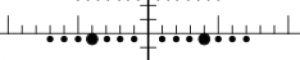
Patented Time-of-Flight Wind Dots provide accurate wind holds in wind speed values (mph, kph, m/s, etc.) to allow for quick and easy holds without a ballistic solver or counting numerous subtensions. These can be calibrated for any ballistics and density altitude providing a universal solution.
The easiest way to calibrate wind dots for your ballistics and current atmospheric conditions is with the free Horus Ballistics App.
To manually calibrate using a ballistic calculator:
• Use the 4th mil line and 2nd wind dot along it, to calibrate the reticle
to your specific ballistics.
• Turn off spin drift in your ballistic engine, manipulate target range
until 4 mils is your elevation solution.
• Using this elevation solution, manipulate the full wind value until your
windage solution is as close to 0.95 mil (sub-tension of 2nd wind dot
on 4th mil line) as possible. This is the 2nd wind dot value.
• Divide the 2nd wind dot value by two, use this new wind value for all ToF wind dots.
Example:
620 yds = 4 Mil elevation hold
0.95 mil wind hold = 8 mph wind value (2nd dot, 4th mil line)
8 ÷ 2 = 4 mph wind dot value
The Horus TREMOR3, TREMOR4, and TREMOR5 reticles all have wind dots. You can find a list of brands offering Horus reticles View brands offering Horus reticles.
Watch the full video Watch the full video in the Learning Lab.